Making CIDER More Discoverable
This series about the notable changes in CIDER 2.0 continues with the change you’ll bump into first, whatever your workflow: the transient menus, and the broader push to make CIDER’s functionality discoverable.
The problem: CIDER is huge
CIDER has well over 300 interactive commands. I’ll admit something I’ve said before: there are features in CIDER that even I forget exist, and I wrote half of them. For users, historically, the options for finding functionality were:
- memorize cryptic key chords (
C-c C-w i, anyone?) - grep the (very long) manual
- read the source
- stumble on a feature by accident three years in and feel robbed
That’s not great for a tool whose whole pitch is making you more productive. The Emacs answer to this problem was demonstrated years ago by Magit: transient menus, which turn every prefix into a self-documenting popup. It took us embarrassingly long to follow suit, but CIDER 2.0 finally does.
Transient everywhere
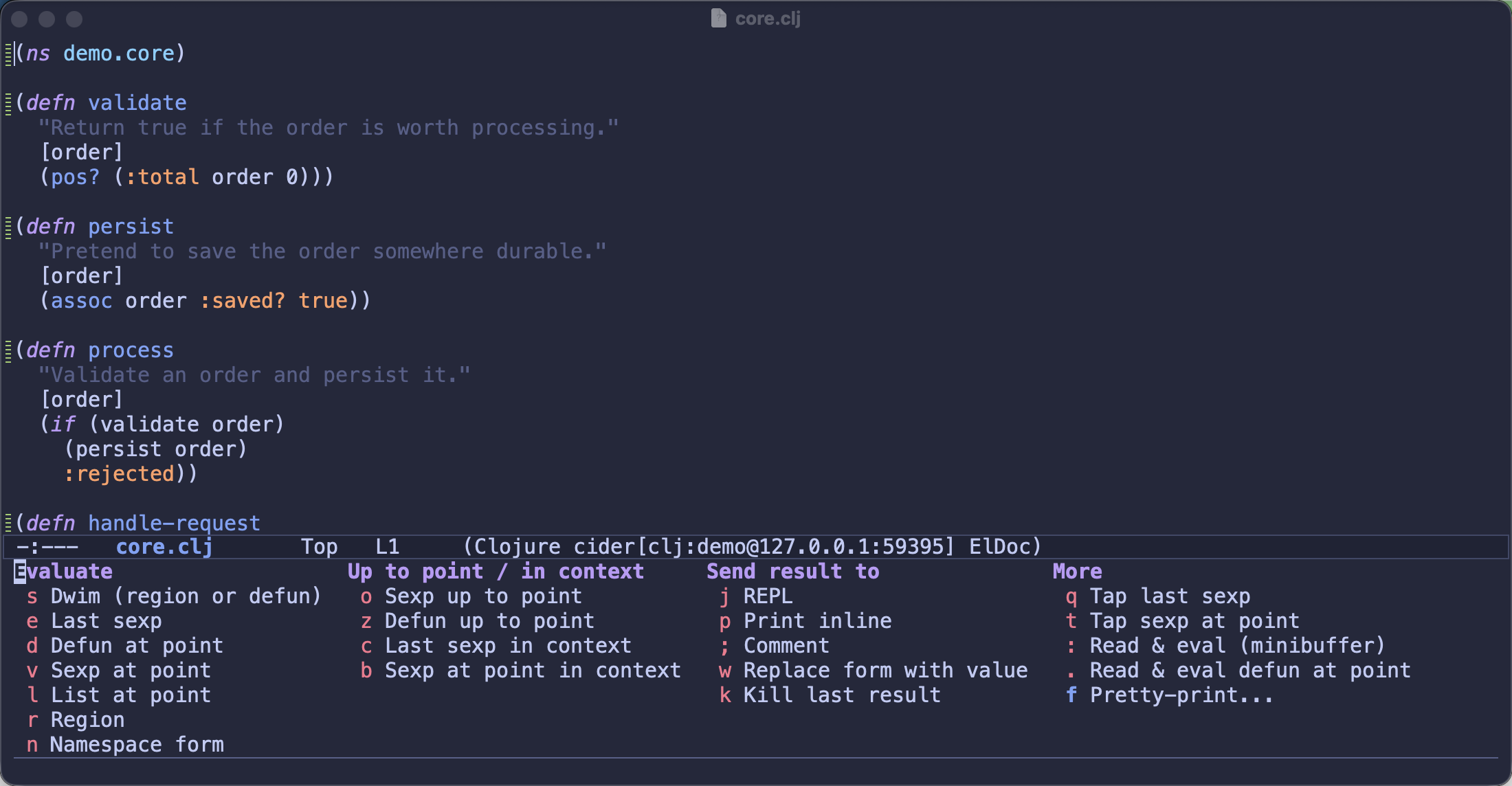
Every command group in CIDER now opens a transient menu: cider-eval-menu at
C-c C-v, cider-doc-menu at C-c C-d, and likewise for test, namespace,
macroexpand, profile, trace and references. A top-level cider-menu ties them
all together, and even the debugger (? mid-session) and the inspector (m)
got menus of their own. Jack-in and connect live in cider-start-menu at
C-c C-x.
Here’s the evaluation menu, which is a good illustration of the problem the
menus solve - I doubt many people knew all of this was hiding behind C-c C-v:
One design constraint was non-negotiable: your muscle memory is safe. These menus
replace bare prefix keymaps, so every existing keybinding works exactly as
before, at full speed - C-c C-v e still evaluates instantly, menu or no
menu. And if you’d rather not see the menus at all unless you actually
hesitate mid-chord, set transient-show-popup to a short delay and they’ll
appear only in that moment of doubt - which is precisely when you need them.
Transient also gave us something the old keymaps never could: arguments.
Menus now carry flags for the things that vary per invocation - pick a
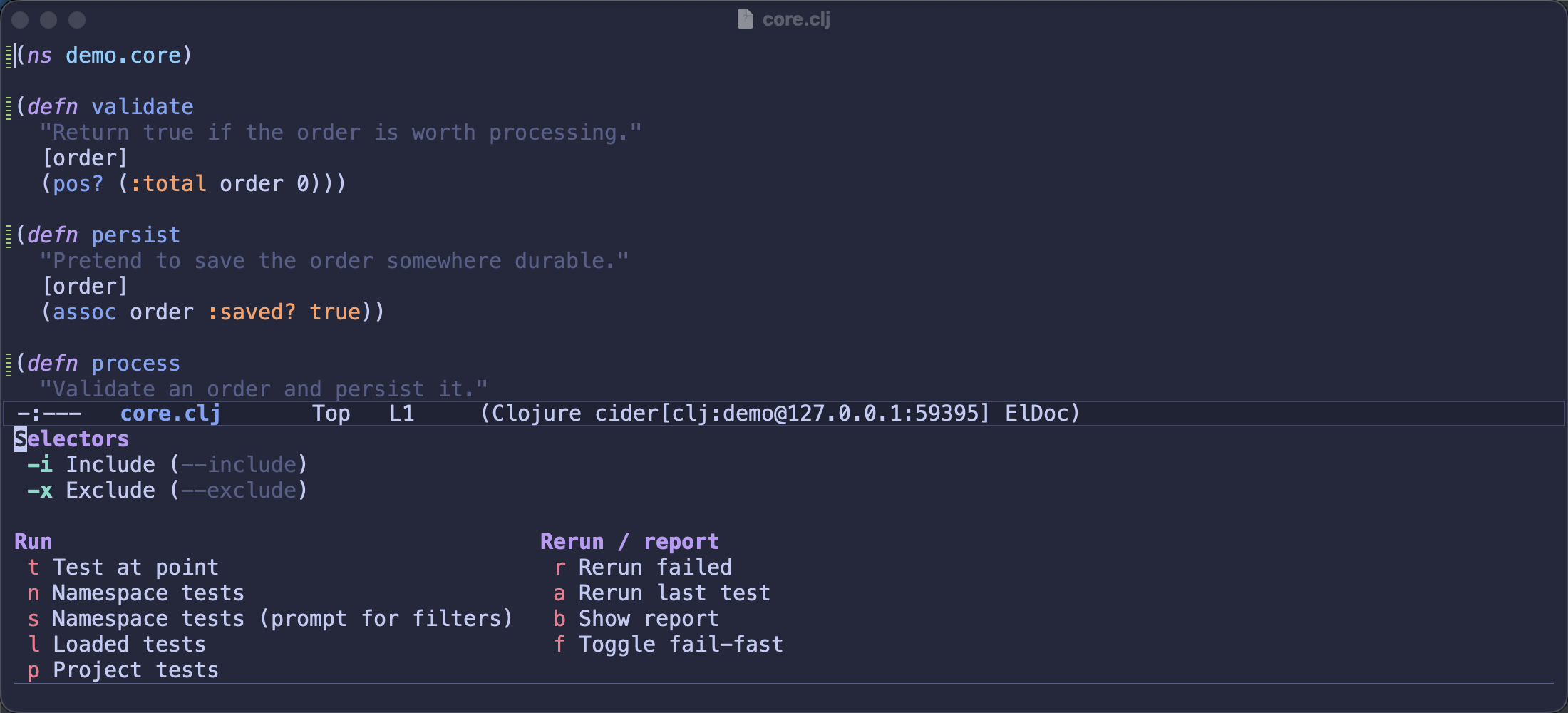
pretty-printer with --print-fn=, set test selectors with
--include=/--exclude= and reuse them across runs, toggle
cider-ns-refresh’s modes explicitly, pass Clojure CLI aliases at jack-in
time. All those “this command behaves differently with a prefix argument”
paragraphs in the manual are becoming visible checkboxes instead.
The test menu shows this nicely - set the selectors once and every run below them picks them up:
Discovery beyond menus
The menus are the headline, but the discoverability push in the 2.0 cycle went wider:
- A new keybindings reference page collects every binding in one place, and the printable refcard was brought back up to date.
- The REPL’s shouty welcome banner is gone, replaced by a one-line hint; the
getting-started material now lives in a summonable reference card
(
C-c C-h, or the,refcardREPL shortcut) - available when you want it, invisible when you don’t. - CIDER now warns (once per session) when you use a deprecated keybinding, so
bindings can actually be retired someday without silently breaking people.
M-x cider-list-deprecated-keybindingsshows what’s on the way out. - The 1.22 cycle’s big audit already made the mode menus expose dozens of commands that were technically present but practically invisible; 2.0 builds on that foundation.
- Even
cider-doctoris discoverability of a sort - it surfaces the problems in your setup that you’d otherwise discover one confusing bug report at a time.
The philosophy
If I had to compress the 2.0 discoverability work into one sentence: the features were always there; now the tool tells you about them. Documentation is where knowledge goes to be forgotten - the only reliable place to teach a user about a feature is inside the workflow itself, at the moment of hesitation. Transient menus are exactly that, and Magit proved the pattern scales to enormous command sets.
If some menu feels wrong - a missing command, a flag that should exist, a grouping that doesn’t match how you think - please file an issue. This part of CIDER is young and very much open to feedback.
The keybindings docs have the full picture. Keep hacking!