Projectile 3.4
Projectile 3.4 is out! After the four releases that preceded it this summer, this one is polish rather than ambition.
Most of it came out of an annoyance I’d been living with for years without ever quite naming it: a lot of what I work on isn’t one directory. CIDER is really CIDER plus cider-nrepl plus orchard plus clj-refactor plus a handful of others. RuboCop is RuboCop plus rubocop-ast plus rubocop-rails and the other extension gems plus the style guide. I’ve been maintaining families of repositories for the better part of a decade.
Lately I’ve also been reaching for git worktrees far more than I used to, so the same repository is now checked out two or three times on my disk at any given moment.
Projectile saw all of that as a pile of unrelated projects, which is exactly what it looks like from the outside.
Somewhere else in the same project
projectile-switch-worktree (s-p W) offers the other checkouts of the repository you’re
in, each labelled with whatever tells it apart - the branch for git, the workspace name for
Jujutsu:
Switch to worktree:
~/src/myapp-main/     (main)
~/src/myapp-hotfix/   (hotfix/crash-on-open)
Git worktrees are the obvious case. Projectile asks git about those, so a worktree you’ve never opened in Emacs shows up anyway. Jujutsu workspaces work the same way.
The case I care about more is the one without any plumbing: a second git clone of the
same upstream. Same workflow, done by hand. I looked at my own ~/projects while writing
this and found four separate clones of CIDER sitting in it. Nothing records those anywhere,
so Projectile can’t ask git to list them - it matches them among your known projects by
their remote instead.
Somewhere else in the same effort
The other half is projectile-switch-sibling-project (s-p n), which offers the projects
related to the one you’re in rather than every project on the machine.
The interesting question was what “related” should mean. My first instinct was to compare directory names and look for a shared prefix. Before writing anything I tried the candidates out on my actual project directory, all ninety-odd repositories of it.
Comparing names does find rubocop, rubocop-ast and rubocop-rails. But grouping by the
owner of the upstream remote finds this:
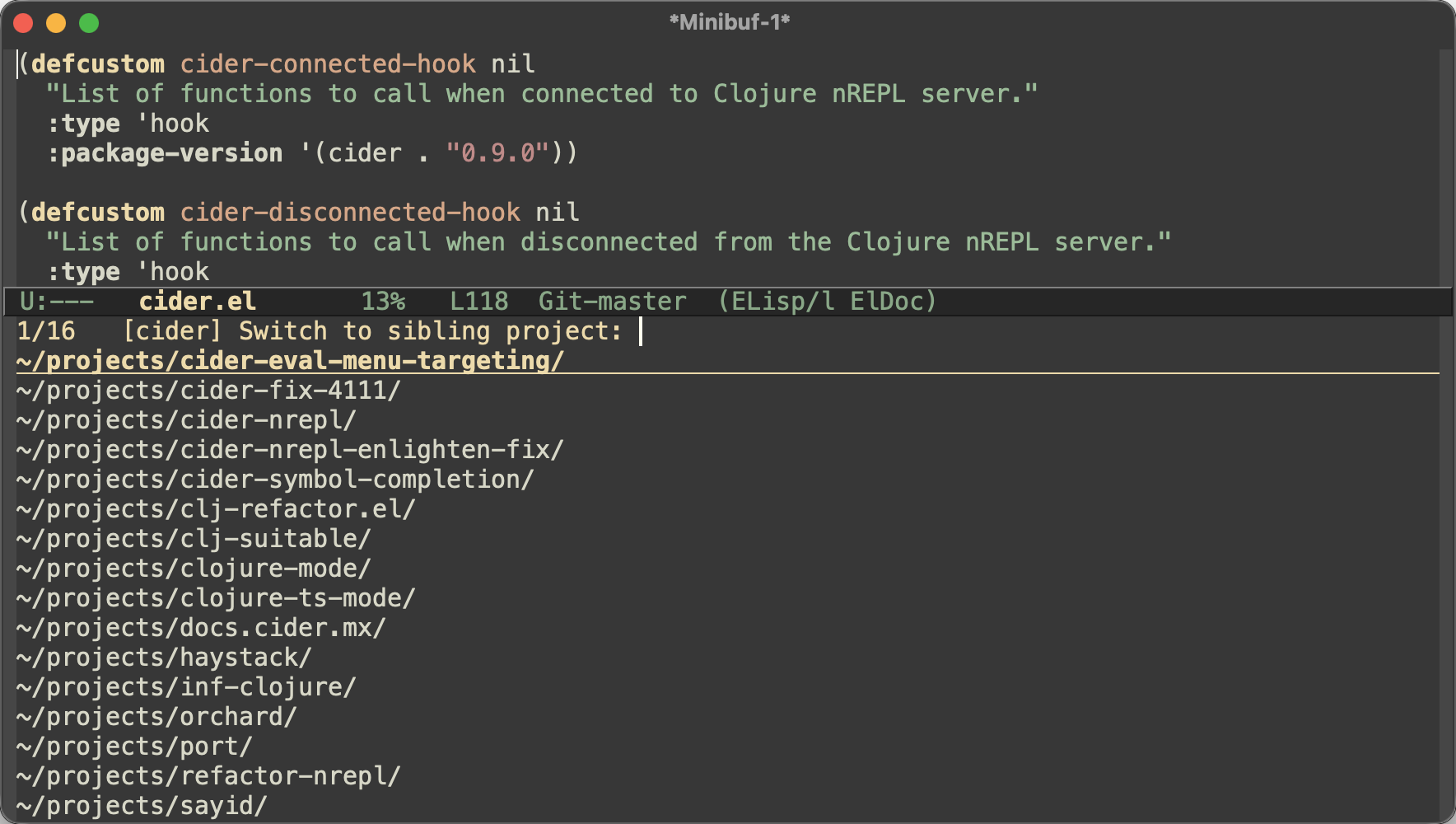
Half of those names have nothing in common with cider, and no amount of staring at
directory names would ever have related them. haystack parses stack traces,
port is a printer registry, sayid is a tracing debugger. Nothing in those
names says “CIDER”.
What they do have in common is an org: they all live under clojure-emacs on GitHub. That’s not incidental, it’s how the project is actually organised - the org is the boundary of the effort, and the individual repositories are just where the pieces ended up when they got big enough to split out. Same story for the rubocop org, and for nrepl. Once I saw that, keying on the owner of the remote was obviously right, because it’s the same fact GitHub is already recording for me.
It needs a bound, though, and the same experiment showed why: about 40% of my checkouts are
under my own GitHub account, and “we’re both under bbatsov” doesn’t relate anything. So an
inferred group covering more than a quarter of your known projects gets dropped and the
next signal takes over.1 If you’d rather just say what belongs together,
projectile-project-groups is there and is never second-guessed.
Switching is only the obvious thing to do with this. Now that Projectile can tell which projects belong together, the same grouping could back a find-file or a search across the whole family - one prompt that reaches every repository in the org rather than just the one you happen to be sitting in. I go looking for “which of these fifteen repos defines this var” often enough that I suspect it’s the more useful half. Nothing built yet, but that’s where I expect this to go.
The commands come with you
Once Projectile knows two directories are the same repository, the command history can follow you between them.
Press M-p at the compile or test prompt in a worktree you made this morning and you get
the commands the project is actually built with, instead of an empty history. That’s an
issue from 2022 that a stale bot had
helpfully closed for me at some point.
What doesn’t follow you is anything that runs without asking - what a prompt is pre-filled
with, and what projectile-repeat-last-command replays. I had those shared too in the
first draft, and then watched a repeat in one worktree rebuild the tree next door. A
remembered command can carry absolute paths back to where it was typed.
More languages, fewer surprises
projectile-run-test-at-point (s-p c .) arrived in 3.1 knowing Python, Go and JS/TS. It
now also knows Ruby (both RSpec and Minitest), Rust, Elixir, Java, Erlang and F#.
Ruby is written the same way whichever framework you use, so there the project type picks
the runner rather than the syntax; Java’s picks between Maven and Gradle. Elixir tests get
addressed as FILE:LINE, because ExUnit can’t select a test by name from the command line.
OCaml deliberately gets nothing - its tests are ordinary values you register with Alcotest
or OUnit, so there’s no syntax to recognize.
projectile-find-file-of-kind (s-p j) and projectile-toggle-related-file (s-p J)
learned Phoenix, Laravel and Next.js. Rails and Django had been the only frameworks with
file-kinds tables out of the box, which felt like a strange place to have stopped.
The reports answer back
The dashboard and the doctor from 3.3 both got a pass. They’re no longer plain text - section headers, field labels and findings are faced by meaning, with findings colored by severity and sorted so anything wanting your attention comes first. The faces only inherit from standard ones, so your theme styles them without knowing Projectile exists.
The doctor’s findings now come with a button that acts on them:
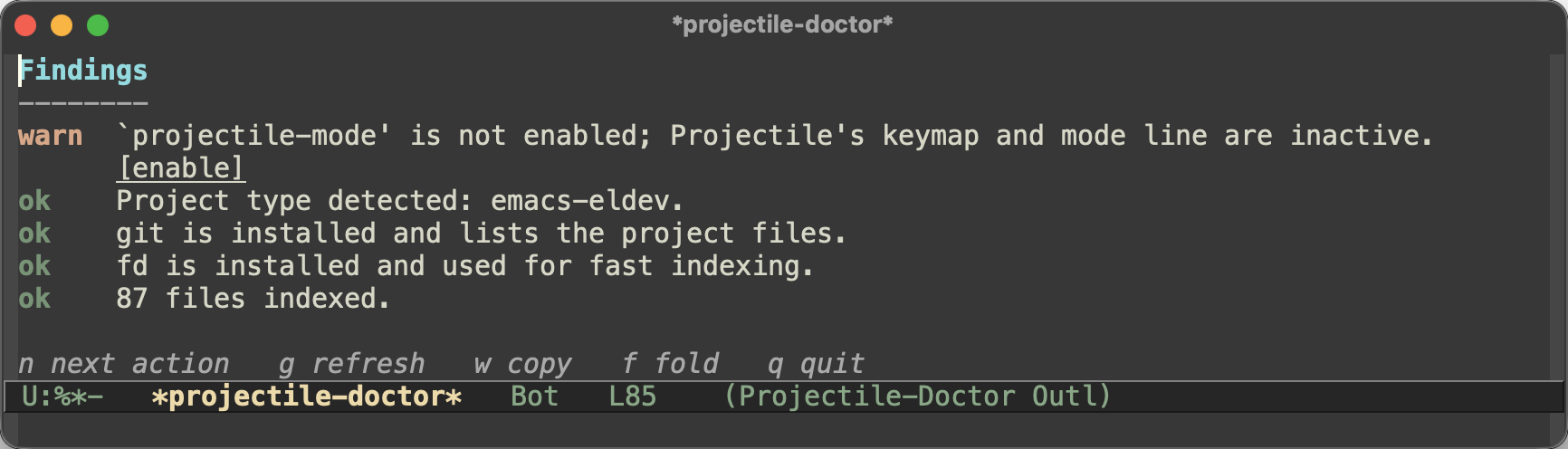
[enable] for a projectile-mode you forgot to turn on, [enable caching] on a big
uncached project, [open dirconfig], [edit .dir-locals.el]. Pressing one regenerates the
report. Findings Projectile can’t act on stay plain advice.
And since a doctor report usually ends up pasted into an issue, w copies the buffer as
plain text, without the faces and buttons.
Odds and ends
projectile-find-changed-file(s-p C) completes over what git reports as staged, unstaged or untracked - or, with a prefix argument, everything that differs from a revision you pick.projectile-run-taskdiscovers rake tasks now, read out of yourRakefileand.rakefiles rather than by runningrake -T, which would load the whole application.projectile-ignored-project-patternsis the regexp-matching sibling ofprojectile-ignored-projects, so keeping a whole area of your machine out of the known projects no longer needs a lambda.- Messages Projectile emits on its own initiative are prefixed with
[Projectile]now, and the ones answering a command you just invoked aren’t. There were five different conventions in there before, which I’d somehow never noticed. - The known projects file, the frecency store and the session directory are resolved with
locate-user-emacs-file, so they land in the right place if your configuration lives in~/.config/emacs. Nothing moves if it doesn’t. - Elixir’s implementation/test toggle offers
foo_test.exsrather thanfoo_test.ex, a script ExUnit will actually run. Project types can declare their test file extension now.
Upgrade notes
Nothing here should break a working setup, but two things are worth knowing.
A batch of options were renamed or folded together. The six
projectile-<cmd>-use-comint-mode options became one projectile-use-comint-mode;
projectile-per-project-compilation-buffer and projectile-per-command-compilation-buffer
became projectile-compilation-buffer-scope; and a handful of options that had broken
their own naming schemes were renamed to match their siblings.2 Every one of them is
still honored under its old name, so your config keeps working - you’ll just see an
obsolescence notice.
Two options are gone: projectile-tags-file-name and projectile-go-project-test-function
were only ever read as Projectile loaded, which means setting them from your init file
afterwards did precisely nothing.
And the command history is now the repository’s rather than the directory’s. Set
projectile-command-history-scope to project if you’d rather have it per directory.
Histories you already have are adopted, not dropped.
The full changelog is here, and the manual is at docs.projectile.mx. The cross-repository features have a page of their own, limitations included.
Five releases in six weeks is not a pace I intend to keep up, and this is the natural place for the burst to land. The big pieces from 3.0 through 3.3 have had their corners sanded down, and what’s left on my list is smaller and less interesting to write about. Which is roughly where a fifteen-year-old package ought to be.
That’s all I have for you today. Keep hacking!
-
Which is why
projectileitself comes back with no siblings on my machine. The cap is working; the answer is a configured group. ↩ -
projectile-global-ignore-file-patterns,projectile-cmd-hist-ignoredups,projectile-related-files-fn-function,projectile-auto-discover, and the three reviewable-search options that were named after replace. ↩